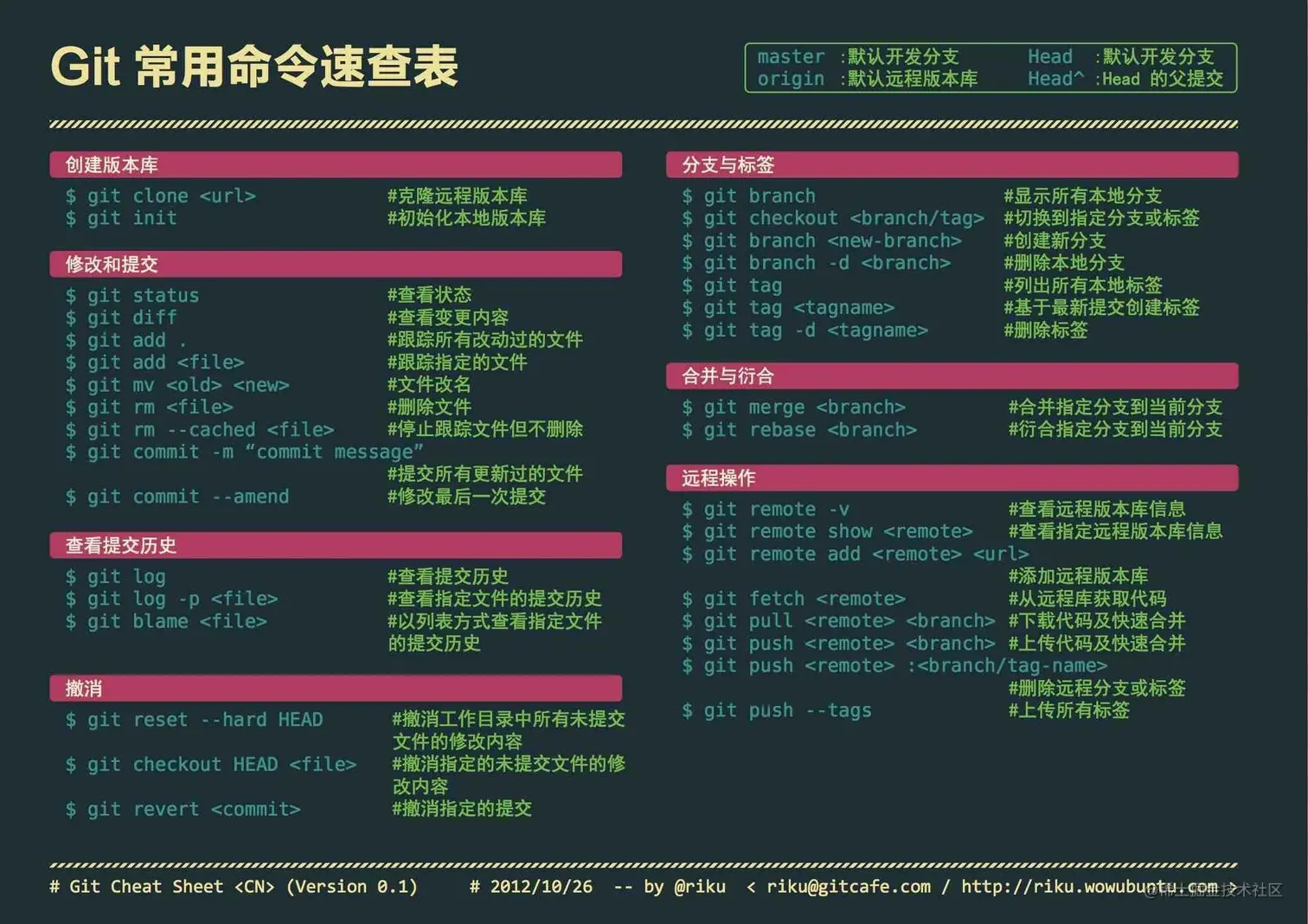
git
git
![image-20230903233755265]()
1
2
3
4
5
6
7
8
9
10
11
12
13
14
15
16
17
18
19
20
21
22
23
24
25
26
27
28
29
30
31
32
33
34
35
36
37
38
39
40
41
42
43
44
45
46
47
48
49
50
51
52
53
|
git config --global user.name 'xb18'
git config --global user.email '450010494@qq.com'
git config core.ignorecase false
git config user.name
git config user.email
git config --list --global
ssh-keygen -t rsa -C "XX@XX.com"
ssh-keygen -t ed25519 -C "450010494@qq.com"
git config --global http.proxy 'http://ip:端口号'
git config --global https.proxy
git config -l
ssh -T git@github.com
echo "# bot-pc" >> README.md
git init
git add README.md
git commit -m "first commit"
git branch -M main
git remote add origin git@github.com:xb18/bot-pc.git
git remote remove origin
git remote -v
git branch --set-upstream-to=origin/master
git branch -M main
git branch -m <旧分支名> <新分支名>
git push -u origin main
git branch -d test
git push --delete origin test
git clone http://XXXX
git add -A
git commit -m "commit message"
git branch
git checkout test
git pull
git push
git status
git config --global credential.helper 'cache --timeout=3600'
git config --global credential.helper store
|
删除取消跟踪文件夹
要删除并取消跟踪Git中的dist文件夹,您需要执行以下步骤:
首先,确保您当前处于Git项目的根目录下。
将dist文件夹中的文件从Git跟踪中移除,但保留本地文件。在终端或命令提示符中运行以下命令:
这将更新Git索引并移除dist文件夹。
接下来,将dist文件夹添加到您的.gitignore文件中,以便Git不会再跟踪它。打开.gitignore文件,并在文件的末尾添加以下行:
保存文件并退出编辑器。
最后,提交对.gitignore文件的更改到Git仓库中。在终端或命令提示符中运行以下命令:
1
2
| git add .gitignore
git commit -m "Ignore dist folder"
|
这将将对.gitignore文件的更改提交到Git仓库中。
现在,dist文件夹已从Git跟踪中移除并被添加到.gitignore文件中,Git不再跟踪它。
svn相关
linux:
1
2
3
4
5
6
7
8
9
10
| svn commit run.sh -F commit_message.txt
svn commit a.sh b.sh -F commit_message.txt
svn commit run.sh -m "第一行消息\n第二行消息\n第三行消息"
svn diff file.txt
svn diff -r 10:20 file.txt
svn log [<path>]
svn info [<path>]
svn status [<path>]
svn add <path>
|
git 提交规范
commit message = subject + :+ 空格 + message 主体
例如: feat:增加用户注册功能
常见的 subject 种类以及含义如下:
- feat: 新功能(feature)
- 用于提交新功能。
- 例如:
feat: 增加用户注册功能
- fix: 修复 bug
- 用于提交 bug 修复。
- 例如:
fix: 修复登录页面崩溃的问题
- docs: 文档变更
- 用于提交仅文档相关的修改。
- 例如:
docs: 更新README文件
- style: 代码风格变动(不影响代码逻辑)
- 用于提交仅格式化、标点符号、空白等不影响代码运行的变更。
- 例如:
style: 删除多余的空行
- refactor: 代码重构(既不是新增功能也不是修复bug的代码更改)
- 用于提交代码重构。
- 例如:
refactor: 重构用户验证逻辑
- perf: 性能优化
- 用于提交提升性能的代码修改。
- 例如:
perf: 优化图片加载速度
- test: 添加或修改测试
- 用于提交测试相关的内容。
- 例如:
test: 增加用户模块的单元测试
- chore: 杂项(构建过程或辅助工具的变动)
- 用于提交构建过程、辅助工具等相关的内容修改。
- 例如:
chore: 更新依赖库
- build: 构建系统或外部依赖项的变更
- 用于提交影响构建系统的更改。
- 例如:
build: 升级webpack到版本5
- ci: 持续集成配置的变更
- 用于提交CI配置文件和脚本的修改。
- 例如:
ci: 修改GitHub Actions配置文件
- revert: 回滚
- 用于提交回滚之前的提交。
- 例如:
revert: 回滚feat: 增加用户注册功能