sequelize
版本
Sequelize CLI [Node: 16.20.2, CLI: 6.6.2, ORM: 6.35.2]
关联
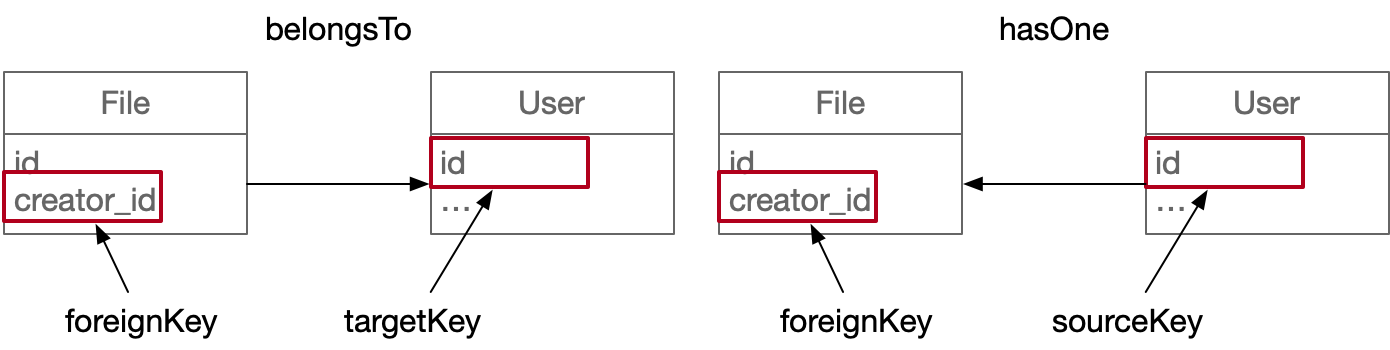
- 两种模型
- 源模型:需要标记和其他模型关系的模型,就是执行联表查询的模型 (上面的 File)
- 目标模型:被标记关系的模型,本身不因此次标记获得联表查询能力 (上面的 User)
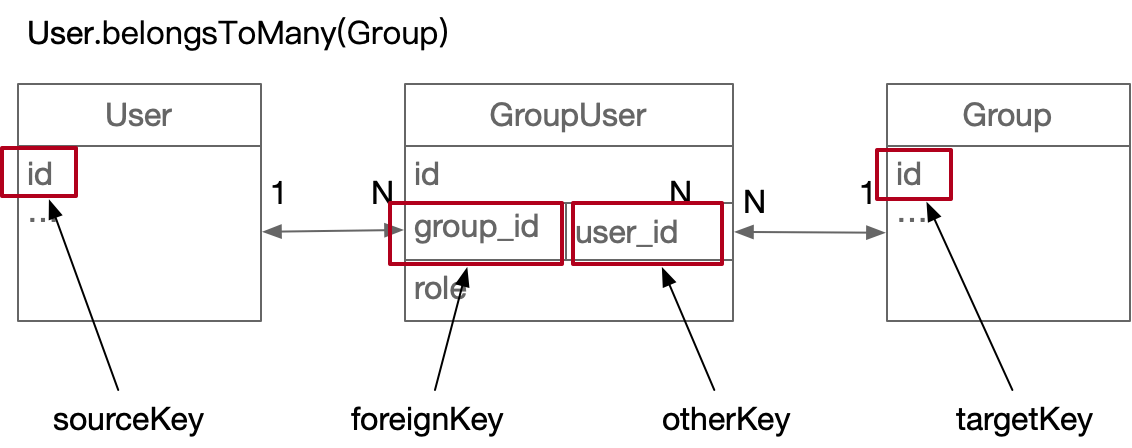
- 四种关联键
- foreignKey:外键,用来关联外部模型,::一个模型有了外键,对关联的模型来说就是唯一了::
- targetKey
- sourceKey
- otherKey:当一个 foreignKey 不够用时的替代品
一对一
![img]()
1
2
3
4
5
6
7
8
9
10
11
12
13
| File.BelongsTo(User, {
foreignKey: 'creator_id',
targetKey: 'id',
});
User.HasOne(File, {
foreignKey: 'creator_id',
sourceKey: 'id',
}
|
一对多
1
2
3
4
5
| User.HasMany(File, {
foreignKey: 'creator_id',
sourceKey: 'id',
}
|
多对多
![img]()
1
2
3
4
5
6
7
8
9
10
11
12
13
14
15
16
| User.BelongsToMany(Group, {
through: GroupUser,
foreignKey: 'group_id',
otherKey: 'user_id',
}
const res = await ctx.model.User.findOne({
where: whereParams,
include: [{
model: ctx.model.CustomAttr,
as: 'uc',
attributes: ['id', 'attr_en', 'attr_cn'],
through: { attributes: [] },
}],
})
|
迁移
基础命令
Sequelize migration 提供了一组命令,用于管理数据库迁移。这些命令可以帮助您创建、运行、回滚和查看数据库迁移的状态。以下是一些常用的 Sequelize migration 命令:
创建一个新的迁移文件:
1
| npx sequelize-cli migration:generate --name <migration-name>
|
运行所有未执行的迁移:
1
| npx sequelize-cli db:migrate
|
运行特定的迁移文件:
1
| npx sequelize-cli db:migrate --to <migration-name>
|
撤销上一个迁移文件:
1
| npx sequelize-cli db:migrate:undo
|
撤销所有已执行的迁移文件:
1
| npx sequelize-cli db:migrate:undo:all
|
查看数据库中的所有迁移状态:
1
| npx sequelize-cli db:migrate:status
|
这些命令需要在项目的根目录下执行,并确保已经在项目中安装了 sequelize-cli。
迁移文件示例
新增字段
1
2
3
4
5
6
7
8
9
10
11
12
13
14
15
16
17
18
19
20
21
22
23
24
25
26
27
28
29
30
| 'use strict';
module.exports = {
up: async (queryInterface, Sequelize) => {
try {
await queryInterface.addColumn('conf_log', 'description', Sequelize.STRING(200));
} catch (e) {
console.log(e);
}
},
down: (queryInterface, Sequelize) => {
}
};
|
新增表
1
2
3
4
5
6
7
8
9
| const { INTEGER, STRING, DATE } = Sequelize;
await queryInterface.createTable('user_ldap', {
id: {
type: INTEGER,
primaryKey: true,
autoIncrement: true,
unique: 'user_ldap_primary_constraint_id_pid'
}
});
|
修改字段
1
2
3
| await queryInterface.changeColumn('conf_favorite', 'property', {
type: Sequelize.STRING(2000)
});
|
添加索引
1
| await queryInterface.addIndex('conf_vote', ['cuid'], {name: 'conf_vote_cuid'});
|
插入数据
1
2
3
4
5
6
7
8
9
10
11
12
13
14
15
16
17
18
| await queryInterface.bulkInsert(
'power_dict',
[
{
power: 0,
name: '用户',
created_at: new Date(),
updated_at: new Date(),
},
{
power: 1,
name: '管理员',
created_at: new Date(),
updated_at: new Date(),
},
],
{},
);
|
returning:默认为 false。设置为 true 时,会返回插入的记录,可以在 await 表达式中获取到。individualHooks:默认为 false。设置为 true 时,将对每个记录依次执行模型的钩子函数。transaction:默认为 null。可以传入一个事务对象,将插入操作包裹在该事务内,确保插入操作的原子性。
删除表
1
| await queryInterface.dropTable('message');
|
删除数据
1
| await queryInterface.bulkDelete('power_dict', null, {});
|
删除索引
1
| await queryInterface.removeIndex('message', 'message_msg_id');
|
添加外键
1
2
3
4
5
6
7
8
9
10
| queryInterface.addConstraint('ConfStatistics', ['gid'], {
type: 'foreign key',
name: 'fk_ConfStatistics_Group',
references: {
table: 'Group',
field: 'gid'
},
onDelete: 'cascade',
onUpdate: 'cascade'
});
|
OP
如果使用eggjs可以如下获取OP:
1
2
3
4
5
6
7
8
9
10
11
12
13
14
15
16
17
18
19
20
21
22
| const { ctx } = this;
let Sequelize = this.app.Sequelize;
const Op = Sequelize.Op;
const message = await this.findOne({
where: {
msg_id
}
});
const id = message.id;
return await ctx.model.Message.findAll({
where: {
id: {
[Op.lt]: id
}
},
attributes: {
exclude: ['field3', 'field4']
},
limit: limit,
order: [['id', 'DESC']]
});
|
或者:
import { Sequelize, Op, DataTypes } from ‘sequelize’;
attributes
1
2
3
4
5
6
7
8
9
10
11
12
13
14
15
16
17
18
19
20
21
22
23
24
|
attributes: ['field1', 'field2']
attributes: {
exclude: ['field3', 'field4']
}
attributes: [
['account', 'userId']
]
attributes: [
[Sequelize.fn('IFNULL', Sequelize.col('nick'), Sequelize.col('name')), 'nickname']
]
attributes: [
[
sequelize.literal("CASE WHEN `nick` IS NULL AND `name` IS NOT NULL THEN `name` ELSE `account` END"),
'nickname'
]
]
|
plain
1
2
3
4
5
| resultData = JSON.parse(JSON.stringify(resultData));
|
时区
默认存储是国际时间
可修改配置:
timezone: ‘+08:00’
这样改完数据库时间显示会加8小时,用原生sql语句查询也会显示东八区时间
但是sequelize查询出来的时间还是会自动转换为国际时间
1
2
3
4
5
6
7
8
9
10
|
function format_date(date){
date = date.replace("Z", '')
let temp = new Date(date)
let d = new Date(temp.getTime() + (1000 * 60 * 60 * 8))
return `${d.getFullYear()}-${d.getMonth()+1}-${d.getDate()} ${d.getHours()}:${d.getMinutes()}`
}
|
默认字段
当你使用 Sequelize 创建模型时,它会根据模型的定义自动创建一些默认字段。下面是一些 Sequelize 默认会创建的字段:
id: Sequelize 默认会创建一个名为 id 的自增主键字段。createdAt 和 updatedAt: Sequelize 默认会创建两个时间戳字段 createdAt 和 updatedAt,用于记录数据的创建时间和最近一次更新时间。deletedAt: 如果你启用了软删除功能(通过 paranoid: true),Sequelize 会创建一个名为 deletedAt 的字段,它用于记录数据的删除时间。注意,启用了软删除功能后,调用 destroy 方法实际上是将数据的 deletedAt 字段设置为当前时间,而不是直接从数据库中删除数据。
这些是 Sequelize 默认会创建的字段,它们在模型定义中是隐式的,你无需显式地定义它们。当你使用 Sequelize 进行数据库迁移时,它会自动在对应的数据表中创建这些字段。
当然,你也可以根据需要自定义字段,例如定义自己的主键,或添加其他的属性字段。在模型定义中,你可以使用 Sequelize 提供的各种数据类型和约束来定义你的自定义字段。
总之,Sequelize 根据模型定义自动生成一些默认字段,如 id、createdAt、updatedAt 和(在启用软删除时)deletedAt 字段。但你也可以根据需要自定义和添加其他字段。
配置选项
全局配置
1
2
3
4
5
6
7
8
9
10
11
12
13
14
15
16
17
18
19
20
21
22
23
24
25
26
27
28
29
| config['sequelize'] = {
dialect: DB_DIALECT as any,
host: DB_IP,
port: Number(DB_PORT),
database: DB_NAME,
username: DB_USER,
password: DB_PWD,
timezone: DB_ZONE,
define: {
timestamps: true,
paranoid: true,
freezeTableName: true,
underscored: true,
},
logging: true,
dialectOptions: {
dateStrings: true,
typeCast: true,
},
pool: {
max: 50,
min: 0,
acquire: 30000,
idle: 10000,
},
};
|
不添加物理约束
1
2
3
| ConfStatistics.associate = function() {
ConfStatistics.belongsTo(app.model.Group, { foreignKey: 'gid', targetKey: 'gid', as: 'g', constraints: false });
};
|